Email for AI agents, on your own domain
Let agents send and receive email over a clean, predictable HTTP API — ideal for automated workflows, tool use, and human-in-the-loop email.
In short
Give each AI agent its own mailbox, such as agent@yourdomain.com, inside your Cloudflare account. Claude Code, Codex, OpenClaw, Hermes Agent and Pi install the skill your deployment serves and then check, read, send and reply to email when you ask; other agents use the same plain HTTP API. Each agent holds a key that reaches only its own mailbox, gets a signed webhook when mail arrives, and costs nothing per inbox.
Works in your coding agent
Claude Code, Codex, OpenClaw, Hermes and Pi install the same skill file and use your mailboxes when you ask.
Machine-readable discovery
OpenAPI 3.1, interactive docs, llms.txt, and an installable agent skill ship with every deployment.
Per-agent keys
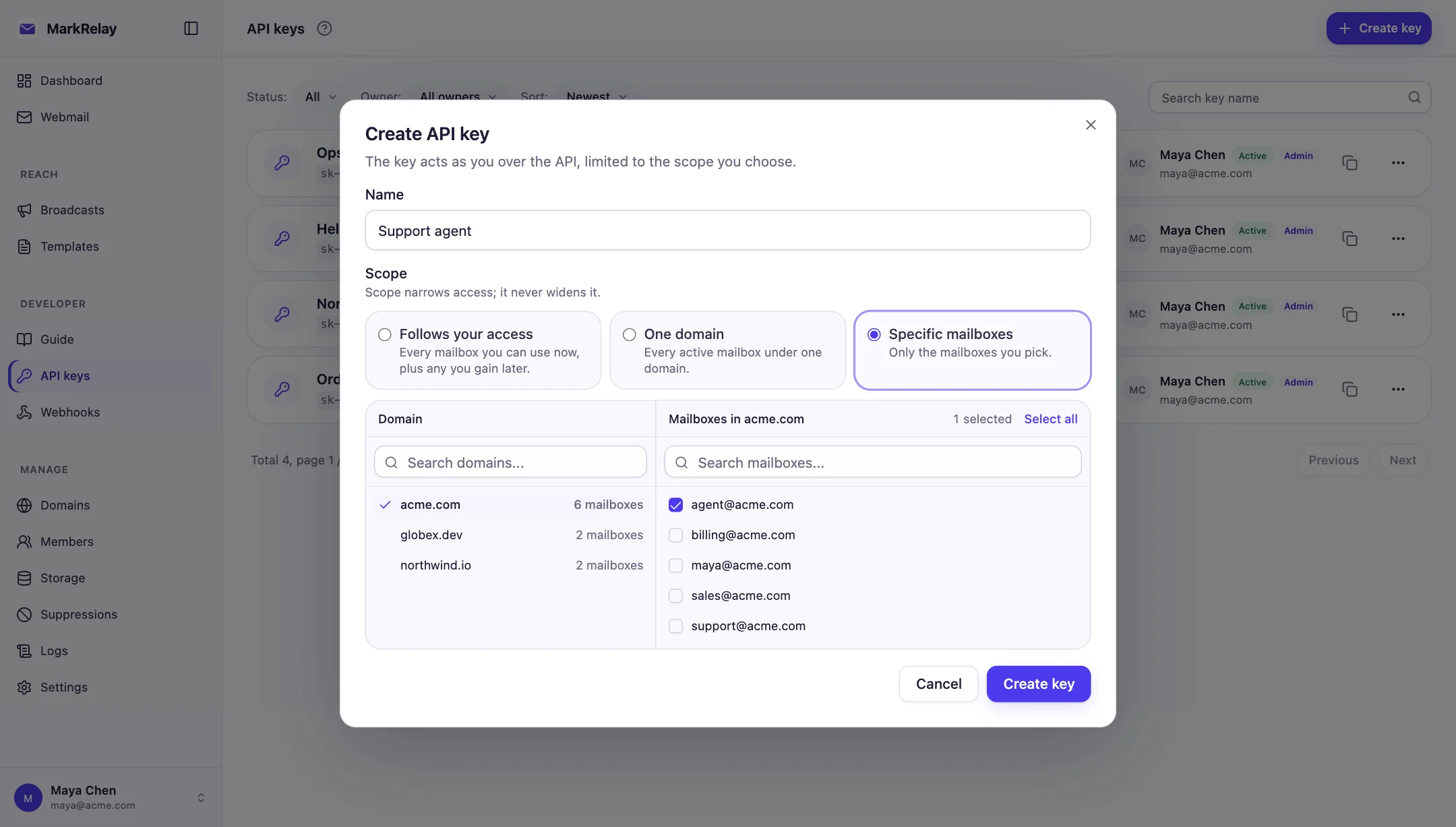
Give each agent a personal key narrowed to a domain or selected mailboxes.
Send, read, reply
Full inbound + outbound, so agents can hold real conversations.
Ask your agent to handle email
Once the skill is installed, you talk to your agent in plain language: check a mailbox, summarize what came in, reply to the easy ones, leave the rest for you. The skill tells the agent which calls to make, how to page through results and what never to retry.
›Check agent@acme.com for unread mail. Answer password-reset requests yourself and flag anything else for me.●Using skill markrelay-mail$curl -s -H "Authorization: Bearer $MARKRELAY_API_KEY" "$MARKRELAY_API_URL/emails?mailbox=agent@acme.com&read=false"2 unread: “Reset my password please” (Sam Patel) · “Where is order #4830?” (Elena García)$curl -s -X POST … "$MARKRELAY_API_URL/emails/b68419a2-…/reply" -d '{"text":"Hi Sam, I have sent a fresh reset link…"}'{"id":"528a8469-74ee-4dc4-8023-0d3882699ad2"}●Replied to Sam Patel with a fresh reset link. Elena García is asking about order #4830, which needs a tracking lookup, so I left it unread for you.
Works with the agent you already use
Every deployment serves one Agent Skills file that Claude Code, Codex, OpenClaw, Hermes Agent and Pi all load. The quickest setup is a single message: paste it into your agent and it installs the skill, asks you for the key, stores it and checks the connection.
The address you open MarkRelay at. The prompts and commands below fill it in; until then the prompt asks your agent to ask you.
Install the MarkRelay skill in Claude Code
Fastest: paste this into Claude Code
It installs the skill, asks you for the key, stores it, and checks the connection.
Set up the MarkRelay email skill for yourself. First ask me for my MarkRelay address (for example https://mail.example.com); below it is called MARKRELAY_URL. Then, download MARKRELAY_URL/skills/SKILL.md to ~/.claude/skills/markrelay-mail/SKILL.md. Then save MARKRELAY_API_URL=MARKRELAY_URL/openapi/v1 and MARKRELAY_API_KEY in the env section of ~/.claude/settings.json. Ask me for the key; never put it in a repository. Finally, use the skill to list the mailboxes the key can reach. Tell me if I need to restart Claude Code.Or do it yourself
1. Install the skill
mkdir -p ~/.claude/skills/markrelay-mail
curl -fsS https://<your-deployment>/skills/SKILL.md \
  -o ~/.claude/skills/markrelay-mail/SKILL.md
2. Give it the API URL and key
{
  "env": {
    "MARKRELAY_API_URL": "https://<your-deployment>/openapi/v1",
    "MARKRELAY_API_KEY": "sk-..."
  }
}
Or export the two variables in your shell before starting claude.
3. Ask, or call /markrelay-mail
- Claude loads the skill on its own when you ask about email, or you can call it with /markrelay-mail.
- For one repository only, put the skill in .claude/skills/markrelay-mail instead.
Install the MarkRelay skill in Codex
Fastest: paste this into Codex
It installs the skill, asks you for the key, stores it, and checks the connection.
Set up the MarkRelay email skill for yourself. First ask me for my MarkRelay address (for example https://mail.example.com); below it is called MARKRELAY_URL. Then, download MARKRELAY_URL/skills/SKILL.md to ~/.agents/skills/markrelay-mail/SKILL.md. Then save MARKRELAY_API_URL=MARKRELAY_URL/openapi/v1 and MARKRELAY_API_KEY in export lines in my ~/.zshrc. Ask me for the key; never put it in a repository. Finally, use the skill to list the mailboxes the key can reach. Tell me when to restart Codex.Or do it yourself
1. Install the skill
mkdir -p ~/.agents/skills/markrelay-mail
curl -fsS https://<your-deployment>/skills/SKILL.md \
  -o ~/.agents/skills/markrelay-mail/SKILL.md
2. Give it the API URL and key
export MARKRELAY_API_URL=https://<your-deployment>/openapi/v1
export MARKRELAY_API_KEY=sk-...
Codex passes your shell's variables to the commands it runs. If you filter them with shell_environment_policy, include both.
3. Ask, or call $markrelay-mail
- Mention the skill with $markrelay-mail, pick it from /skills, or let Codex choose it.
- ~/.agents/skills is shared with OpenClaw and Pi, so one copy serves all three.
Install the MarkRelay skill in OpenClaw
Fastest: paste this into OpenClaw
It installs the skill, asks you for the key, stores it, and checks the connection.
Set up the MarkRelay email skill for yourself. First ask me for my MarkRelay address (for example https://mail.example.com); below it is called MARKRELAY_URL. Then, download MARKRELAY_URL/skills/SKILL.md to ~/.agents/skills/markrelay-mail/SKILL.md. Then save MARKRELAY_API_URL=MARKRELAY_URL/openapi/v1 and MARKRELAY_API_KEY in skills.entries."markrelay-mail".env in ~/.openclaw/openclaw.json. Ask me for the key; never put it in a repository. Finally, use the skill to list the mailboxes the key can reach.Or do it yourself
1. Install the skill
mkdir -p ~/.agents/skills/markrelay-mail
curl -fsS https://<your-deployment>/skills/SKILL.md \
  -o ~/.agents/skills/markrelay-mail/SKILL.md
2. Give it the API URL and key
{
  skills: {
    entries: {
      "markrelay-mail": {
        env: {
          MARKRELAY_API_URL: "https://<your-deployment>/openapi/v1",
          MARKRELAY_API_KEY: "sk-...",
        },
      },
    },
  },
}
The Gateway runs as a service, so set the variables here rather than in your shell.
3. Ask, or call /markrelay-mail
- OpenClaw also reads ~/.openclaw/skills. The new skill appears on your next message; no restart needed.
- Ask from any channel OpenClaw is connected to, such as Telegram or WhatsApp: “anything urgent in support@ today?”
Install the MarkRelay skill in Hermes Agent
Fastest: paste this into Hermes Agent
It installs the skill, asks you for the key, stores it, and checks the connection.
Set up the MarkRelay email skill for yourself. First ask me for my MarkRelay address (for example https://mail.example.com); below it is called MARKRELAY_URL. Then, run: hermes skills install MARKRELAY_URL/skills/SKILL.md. Then save MARKRELAY_API_URL=MARKRELAY_URL/openapi/v1 and MARKRELAY_API_KEY in ~/.hermes/.env, and list both in terminal.env_passthrough in ~/.hermes/config.yaml. Ask me for the key; never put it in a repository. Finally, use the skill to list the mailboxes the key can reach.Or do it yourself
1. Install the skill
hermes skills install https://<your-deployment>/skills/SKILL.md2. Give it the API URL and key
MARKRELAY_API_URL=https://<your-deployment>/openapi/v1
MARKRELAY_API_KEY=sk-...terminal:
env_passthrough: [MARKRELAY_API_URL, MARKRELAY_API_KEY]Hermes keeps secrets in ~/.hermes/.env and forwards only the variables you list to its terminal tool.
3. Ask, or call /markrelay-mail
- Hermes installs the skill into ~/.hermes/skills and makes it a slash command: /markrelay-mail check support@ for new mail.
- Install it again after you update MarkRelay to pick up the latest skill.
Install the MarkRelay skill in Pi
Fastest: paste this into Pi
It installs the skill, asks you for the key, stores it, and checks the connection.
Set up the MarkRelay email skill for yourself. First ask me for my MarkRelay address (for example https://mail.example.com); below it is called MARKRELAY_URL. Then, download MARKRELAY_URL/skills/SKILL.md to ~/.agents/skills/markrelay-mail/SKILL.md. Then save MARKRELAY_API_URL=MARKRELAY_URL/openapi/v1 and MARKRELAY_API_KEY in export lines in my ~/.zshrc. Ask me for the key; never put it in a repository. Finally, use the skill to list the mailboxes the key can reach. Tell me when to restart pi.Or do it yourself
1. Install the skill
mkdir -p ~/.agents/skills/markrelay-mail
curl -fsS https://<your-deployment>/skills/SKILL.md \
  -o ~/.agents/skills/markrelay-mail/SKILL.md
2. Give it the API URL and key
export MARKRELAY_API_URL=https://<your-deployment>/openapi/v1
export MARKRELAY_API_KEY=sk-...
Export the two variables in your shell before starting pi.
3. Ask, or call /skill:markrelay-mail
- Pi also reads ~/.pi/agent/skills, and loads the skill when a task matches.
- To call it with /skill:markrelay-mail, turn on skill commands in /settings.
One mailbox and one key per agent
Give each agent its own address, such as agent@yourdomain.com, and a key with Specific mailboxes scope. The agent can list, read and send only from that mailbox; every other address is invisible to it.
Need more agents? Add mailboxes. There is no per-inbox fee.
React the moment mail arrives
Point a signed webhook at your agent runner and it hears about new mail immediately. It reads the message, drafts an answer, waits for a person if the reply is sensitive, and responds in the same thread.
An agent's mailbox loop
Everything goes over plain HTTP with a key scoped to the agent's own mailbox.
- MarkRelayPOST
your-agent/webhookSigned email.received event the moment mail arrives
- AgentGET
/emails/{emailId}Reads the full message and attachments
- You, optionally
Approve the draftKeep a human in the loop for sensitive replies
- AgentPOST
/emails/{emailId}/replyReplies in the same thread, from agent@yourdomain.com
People stay in the loop
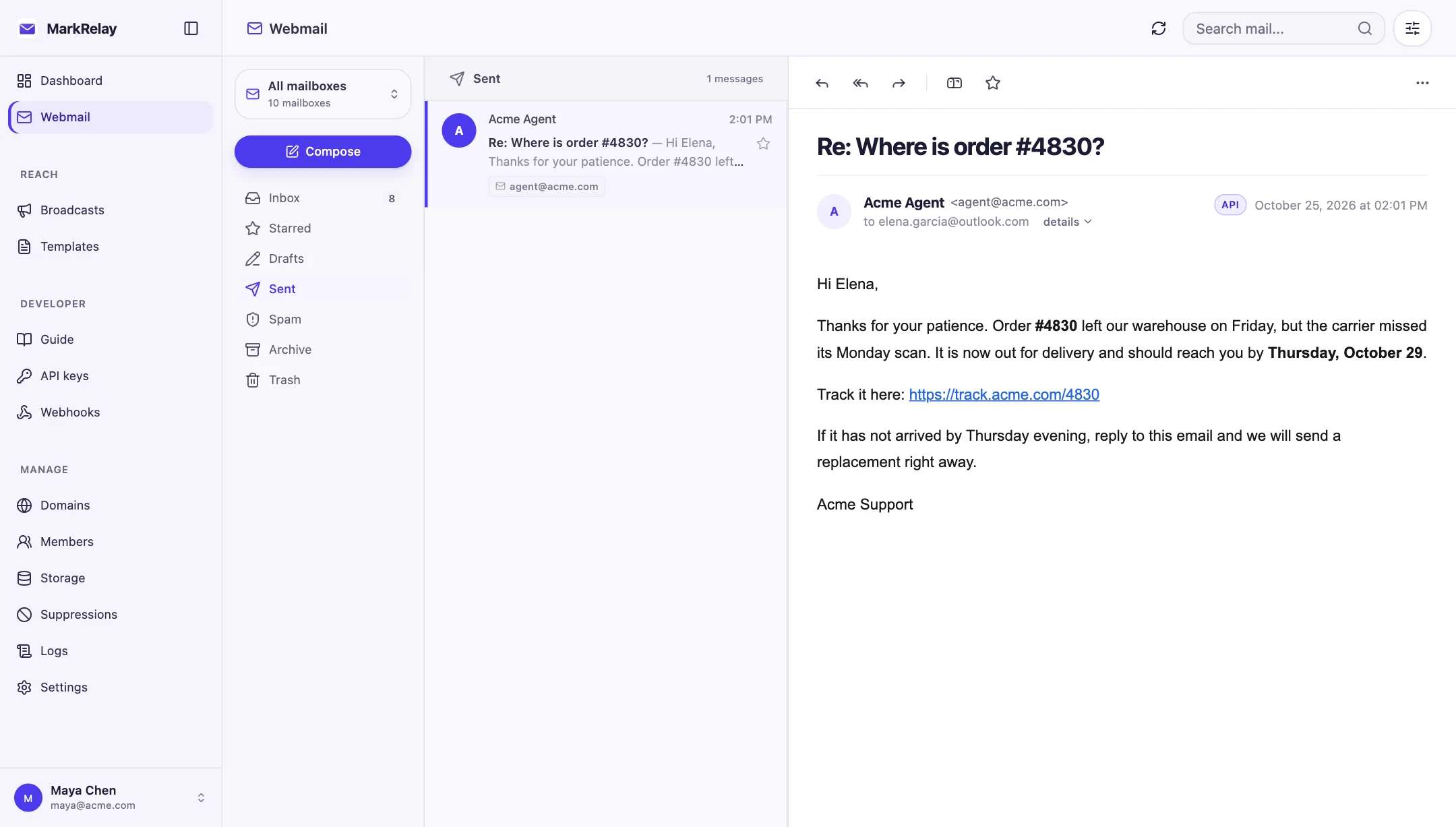
Agents and teammates share the same mailboxes. Everything an agent sends appears in webmail with an API badge, so someone can review it, take over the thread or reply by hand.
Call it from your own code
// Receive, then let your agent reply — all over plain HTTP.
const MARKRELAY_API_URL = process.env.MARKRELAY_API_URL; // https://mail.yourdomain.com/openapi/v1
const MARKRELAY_API_KEY = process.env.MARKRELAY_API_KEY;

const inbox = await fetch(
  `${MARKRELAY_API_URL}/emails?mailbox=agent@yourdomain.com&folder=inbox&read=false`,
  { headers: { Authorization: `Bearer ${MARKRELAY_API_KEY}` } },
).then((r) => r.json());

await fetch(`${MARKRELAY_API_URL}/emails/${inbox.items[0].id}/reply`, {
  method: "POST",
  headers: { Authorization: `Bearer ${MARKRELAY_API_KEY}`, "Content-Type": "application/json" },
  body: JSON.stringify({ text: agentReply }),
});
Common questions
How do I give an AI agent its own email address?
Create a mailbox such as agent@yourdomain.com, create a personal API key scoped to that mailbox, and give the agent the key and your deployment's API URL. Claude Code, Codex, OpenClaw, Hermes and Pi then install the skill your deployment serves at /skills/SKILL.md.
Can the agent read other mailboxes?
No. A key reaches only what its owner can open, narrowed to the scope chosen for it, so a key scoped to agent@ sees nothing else.
Does it work with Claude Code, Codex, OpenClaw and Hermes?
Yes, and with Pi. All of them load the skill in the open Agent Skills format: Claude Code from ~/.claude/skills; Codex, OpenClaw and Pi from ~/.agents/skills; Hermes installs it from your deployment's URL. Any other agent that can make HTTP requests uses the same API through llms.txt or the OpenAPI document.
Is there an MCP server?
Yes. Every deployment is a remote MCP server at /mcp, for Claude, ChatGPT, Cursor and other MCP clients: add the URL, sign in, and pick the mailboxes it may use. Agents that run commands can use the skill and plain HTTP API instead.
How is this different from AgentMail?
AgentMail is a hosted service priced by inboxes and email volume. MarkRelay runs in your own Cloudflare account on your own domain, with no per-inbox fee. See the full MarkRelay vs AgentMail comparison.
Go deeper
Explore more of MarkRelay
Use cases
Own your email stack today
Buy MarkRelay once and run it in your Cloudflare account. MarkRelay adds no per-message or per-seat charge; Cloudflare usage and service limits remain separate.