A self-hosted newsletter on Cloudflare, with no server
Design each issue in a visual editor, import your list, and send from your own domain through your own Cloudflare account, with one-click unsubscribe and a suppression list built in.
Facts checked
In short
MarkRelay Broadcasts are a self-hosted newsletter tool that runs on Cloudflare Workers, D1 and R2 in your own account, so there is no server or VPS to maintain. Design the issue in the visual editor, import up to 100,000 subscribers from a .csv or .xlsx file, schedule it, and follow delivery, opens and clicks per recipient. Every issue carries one-click unsubscribe headers (RFC 8058), and unsubscribes, bounces and complaints are suppressed automatically. MarkRelay charges nothing per subscriber; Cloudflare charges $0.35 per 1,000 emails after the 3,000 included with Workers Paid.
What you get for a newsletter
| Need | MarkRelay |
|---|---|
| Send from your own domain | Yes |
| Runs without a server | Cloudflare Workers, D1, R2 and Queues |
| Visual email editor | Sections, columns, images, buttons; desktop and mobile preview |
| Import subscribers | .csv or .xlsx with an email column; validated and deduplicated |
| Personalization | Every other column becomes a variable, e.g. {{first_name}} |
| Recipients per issue | Up to 100,000 |
| Schedule, pause, resume | Yes |
| One-click unsubscribe (RFC 8058) | On every issue, plus an unsubscribe link |
| Suppression list | Unsubscribes, hard bounces and complaints, automatically |
| Per-recipient results | Delivered, deferred, bounced, complained, opened, clicked |
| Replies | Land in a MarkRelay mailbox your team can answer |
| Next issue | Clone the last broadcast to reuse its list and design |
| Sign-up form and web archive | On your own website; import new subscribers before sending |
| Paid subscriptions | Through your own billing, such as Stripe |
Send from your own domain
- MarkRelay
- Yes
Runs without a server
- MarkRelay
- Cloudflare Workers, D1, R2 and Queues
Visual email editor
- MarkRelay
- Sections, columns, images, buttons; desktop and mobile preview
Import subscribers
- MarkRelay
- .csv or .xlsx with an email column; validated and deduplicated
Personalization
- MarkRelay
- Every other column becomes a variable, e.g. {{first_name}}
Recipients per issue
- MarkRelay
- Up to 100,000
Schedule, pause, resume
- MarkRelay
- Yes
One-click unsubscribe (RFC 8058)
- MarkRelay
- On every issue, plus an unsubscribe link
Suppression list
- MarkRelay
- Unsubscribes, hard bounces and complaints, automatically
Per-recipient results
- MarkRelay
- Delivered, deferred, bounced, complained, opened, clicked
Replies
- MarkRelay
- Land in a MarkRelay mailbox your team can answer
Next issue
- MarkRelay
- Clone the last broadcast to reuse its list and design
Sign-up form and web archive
- MarkRelay
- On your own website; import new subscribers before sending
Paid subscriptions
- MarkRelay
- Through your own billing, such as Stripe
No server
Runs on Cloudflare Workers in your own account.
Your own domain
Every issue goes out from your domain.
No per-subscriber price
One license plus Cloudflare's per-email price.
Compliance tools built in
One-click unsubscribe and an automatic suppression list.
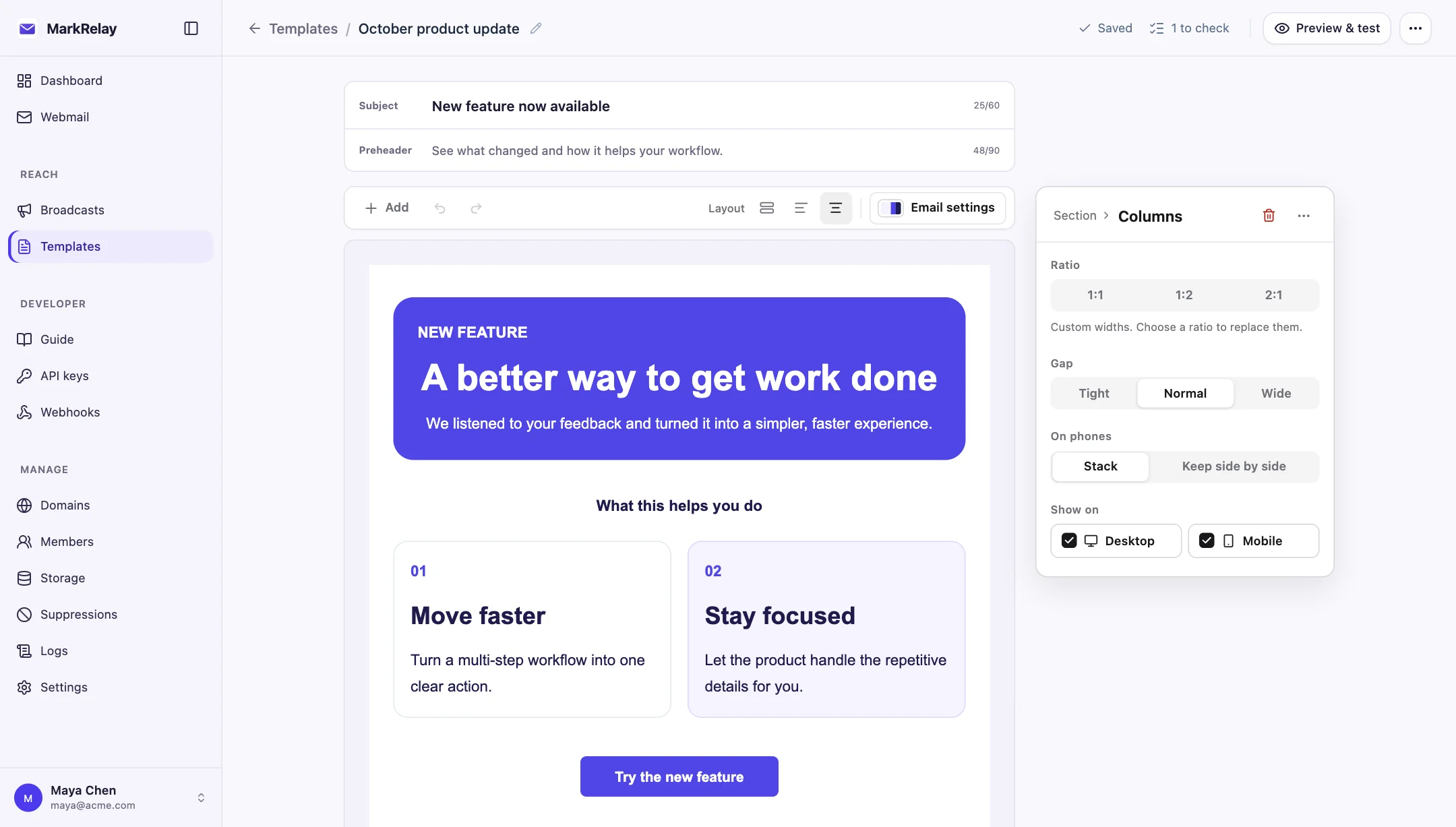
Write the issue in a visual editor
Build each issue from sections, columns, text, images and buttons, start from a template, and preview it on desktop and mobile. Send a test to yourself before the real thing.
Bring the list you already have
Import a .csv or .xlsx export from Substack, beehiiv, Mailchimp or your own database: MarkRelay needs an email column, validates and deduplicates the addresses, and turns every other column into a variable. Anyone on the suppression list is skipped when the issue goes out.
For the next issue, clone the broadcast to keep the list and the design, and import any new sign-ups from your site.
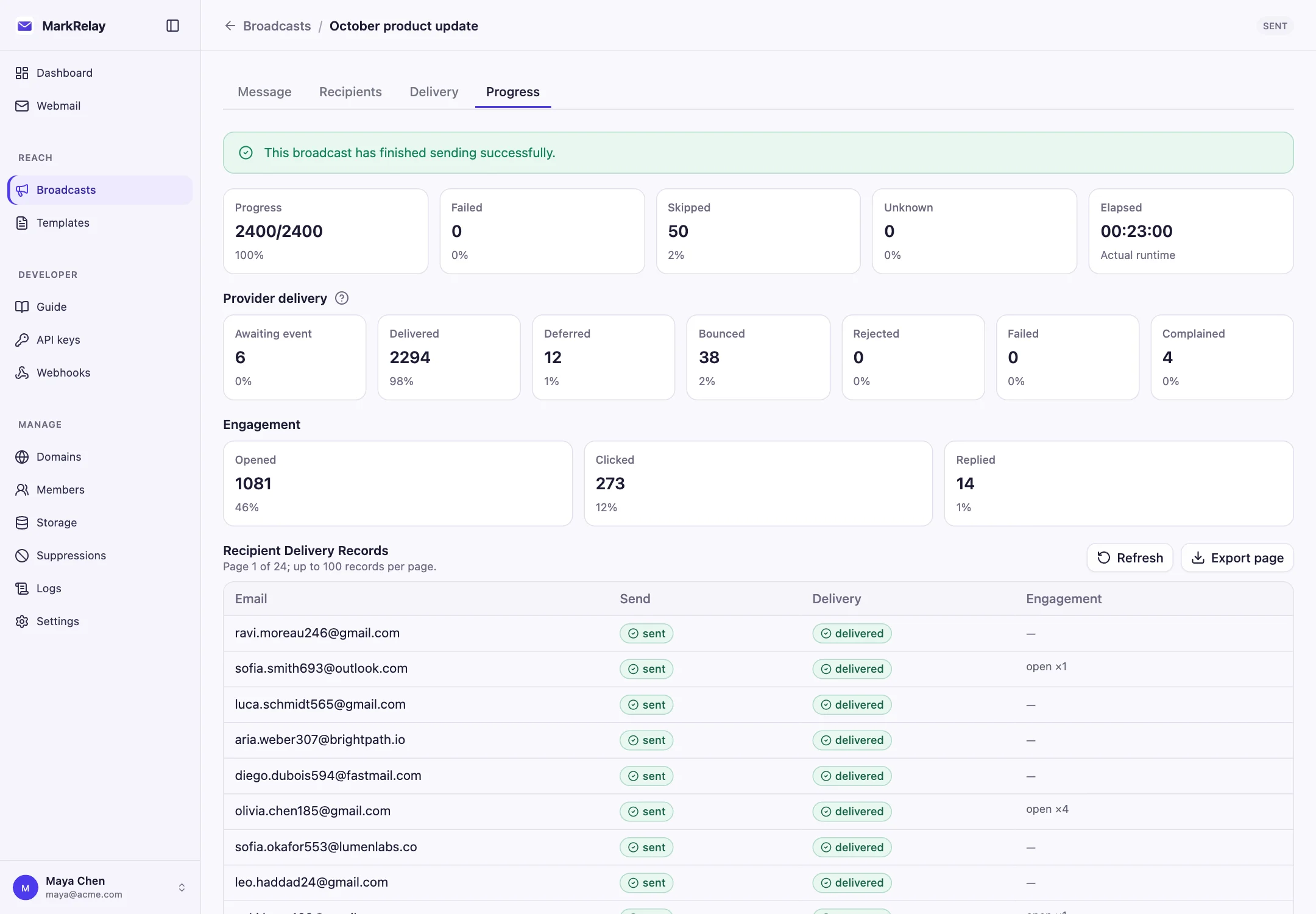
Send, then watch every recipient
Send now or schedule a time; a running issue can be paused and resumed. If Cloudflare's sending rate or daily limit is reached, the broadcast waits and continues on its own.
The Progress tab shows delivery, bounces, complaints, opens and clicks per recipient once the domain's Email Sending events are connected.
Tracking is off by default
A new broadcast adds no open-tracking pixel and rewrites no links. Turn open or click tracking on for a broadcast when you want per-recipient opens and clicks; the pixel and redirects are then served by your own deployment and the results stay in your own database.
See A newsletter without tracking for the defaults, France's CNIL recommendation on tracking pixels, and how other newsletter tools compare.
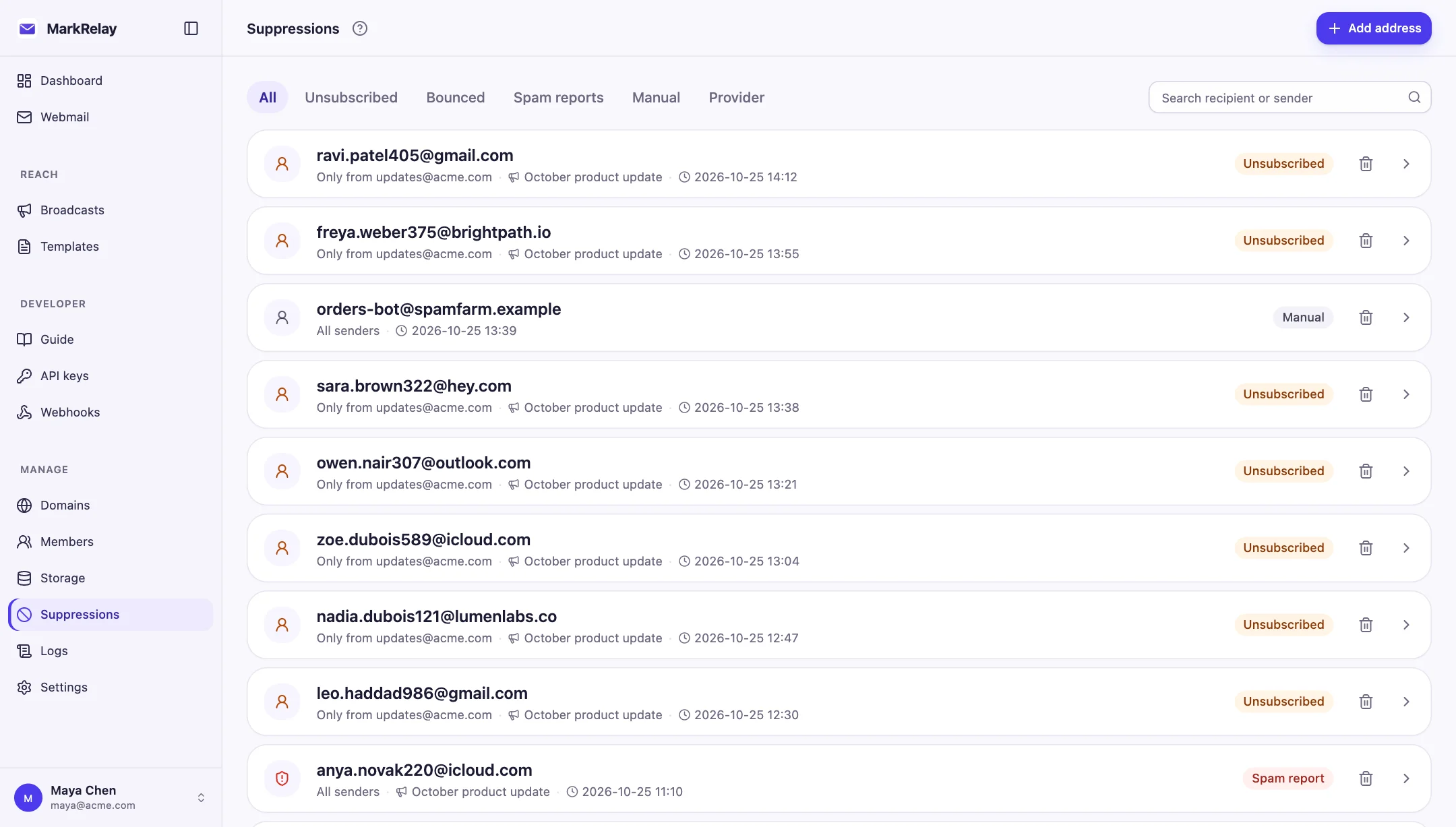
Unsubscribe and suppression, built in
Every issue carries List-Unsubscribe and List-Unsubscribe-Post headers, so Gmail, Yahoo and other inboxes show a one-click unsubscribe. Unsubscribes, hard bounces and spam complaints go on the suppression list automatically.
MarkRelay supplies these tools; you are responsible for consent and for following CAN-SPAM, GDPR and Cloudflare's Email Service terms.
What a weekly newsletter costs per year
| Subscribers | Emails a month | Cloudflare a year | Total, first year |
|---|---|---|---|
| 1,000 | 4,333 | $66 | $165 |
| 5,000 | 21,667 | $138 | $237 |
| 10,000 | 43,333 | $229 | $328 |
1,000
- Emails a month
- 4,333
- Cloudflare a year
- $66
- Total, first year
- $165
5,000
- Emails a month
- 21,667
- Cloudflare a year
- $138
- Total, first year
- $237
10,000
- Emails a month
- 43,333
- Cloudflare a year
- $229
- Total, first year
- $328
Total = Annual license ($99) plus Cloudflare Workers Paid and sending for 12 months, at about 4.33 issues a month. With Lifetime ($249 once), later years cost only the Cloudflare column.
Common questions
Is there self-hosted newsletter software that needs no server?
Yes. MarkRelay runs on Cloudflare Workers, D1, R2 and Queues in your own Cloudflare account and installs with a Deploy to Cloudflare button, so there is no VPS, container or database server to maintain.
How much does it cost to send a newsletter?
MarkRelay charges nothing per subscriber. Cloudflare charges for sending: Workers Paid ($5/month) includes 3,000 sent emails a month, then $0.35 per 1,000; receiving through Email Routing is free. A weekly issue to 10,000 subscribers is about $19 a month at Cloudflare, plus your license.
Can I import subscribers from Substack, beehiiv or Mailchimp?
Yes. Export a CSV from your current tool and import it into a broadcast. MarkRelay needs an email column; every other column becomes a variable you can use in the issue.
Does it include a sign-up form and a public archive?
MarkRelay designs, sends and tracks the email. Collect sign-ups on your own site or form tool, import them before each issue, and publish the web version of each issue on your site.
Who is responsible for compliance?
The sender. MarkRelay adds one-click unsubscribe headers and a suppression list to every issue; you are responsible for consent and for following CAN-SPAM, GDPR and Cloudflare's Email Service terms.
Go deeper
Explore more of MarkRelay
Use cases
Own your email stack today
Buy MarkRelay once and run it in your Cloudflare account. MarkRelay adds no per-message or per-seat charge; Cloudflare usage and service limits remain separate.