Forward Inbound Email to a Webhook
Webhooks notify your application when a new email reaches an authorized MarkRelay mailbox. Use them to open support tickets, trigger workflows, archive messages, or hand new conversations to an AI agent. A webhook can also post each new email to a team chat, so a channel hears about new mail the moment it arrives.
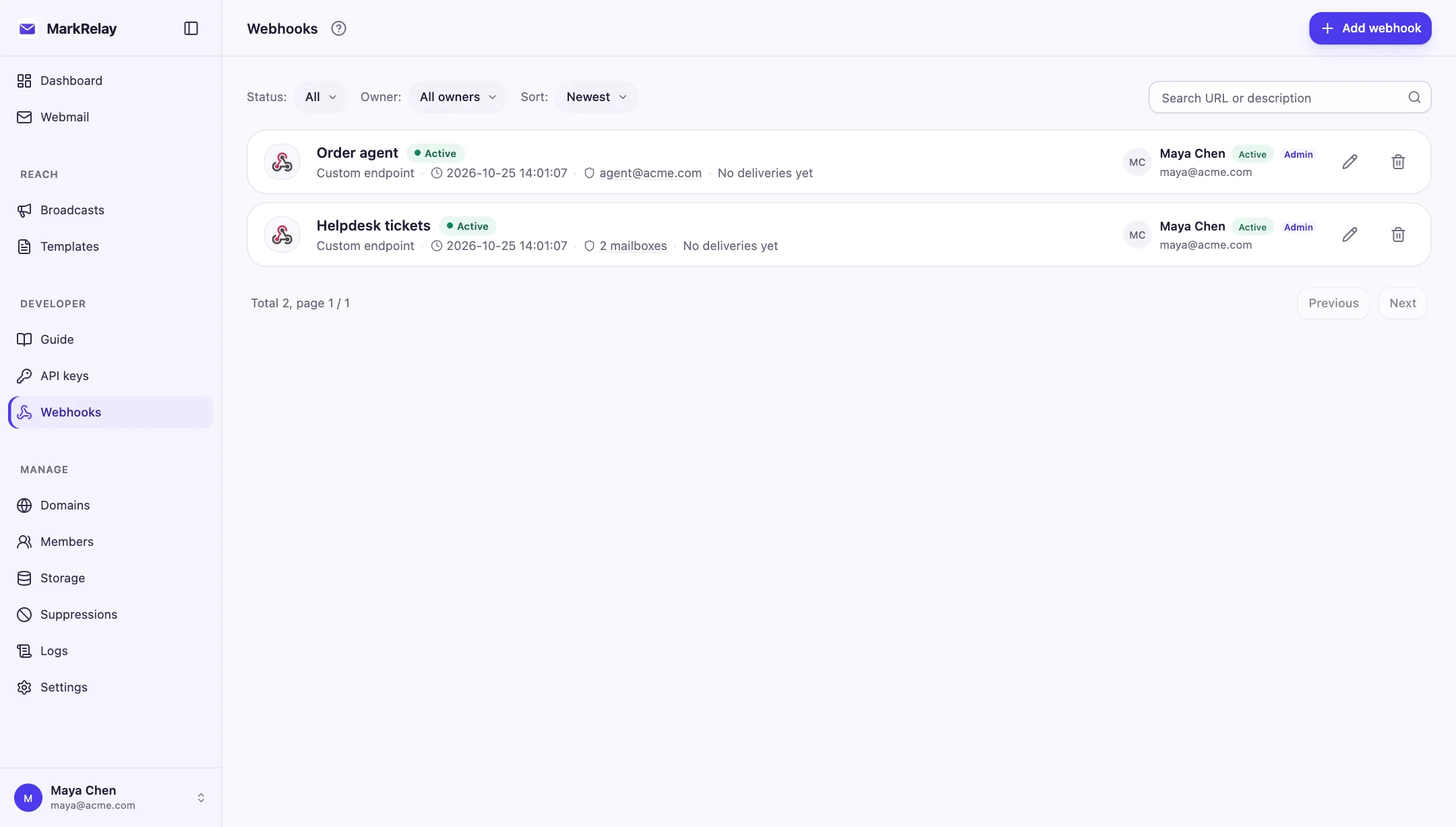
Create a webhook
- Open Developer → Webhooks and select Add webhook.
- Destination: choose Custom endpoint for your own server, or a team chat.
- Connect: paste the public HTTP or HTTPS URL and, optionally, a description. Select Send test to check the URL before you add the webhook.
- Mailboxes: choose whether it follows your access, covers one domain, or covers specific mailboxes, then select Add webhook.
- For a custom endpoint, copy the
whsec_...signing secret.
The signing secret is shown once, when a custom endpoint is added. Store it in your application's secret manager before closing the dialog. A test sent before the webhook exists is signed with a one-time key, so check signatures with a test sent from Edit after it is added.
Edit, test and pause a webhook
Select the pencil icon on a webhook to change its URL, description, platform signing secret or mailboxes. Send test in this dialog delivers a webhook.test message using the settings as entered, so you can try a new URL before saving it. Disable and Enable take effect at once. To send mail to a different platform, add a new webhook.
Event request
POST /your-endpoint
Content-Type: application/json
X-MarkRelay-Event: email.received
X-MarkRelay-Webhook-Id: <webhook-id>
X-MarkRelay-Timestamp: 2026-07-21T12:00:00.000Z
X-MarkRelay-Signature: sha256=<signature>

{
  "event": "email.received",
  "webhookId": "...",
  "timestamp": "2026-07-21T12:00:00.000Z",
  "data": {
    "id": "...",
    "mailbox": "support@example.com"
  }
}
The data object contains the received email, including its mailbox, sender, recipients, content, and attachment information.
Verify the signature
MarkRelay signs the timestamp and raw JSON body with HMAC-SHA256. Verify the signature before parsing or processing the event:
const rawBody = await request.text();
const timestamp = request.headers.get("X-MarkRelay-Timestamp") ?? "";
const signature = request.headers.get("X-MarkRelay-Signature") ?? "";

const expected = await hmacSha256Hex(
  process.env.MARKRELAY_WEBHOOK_SECRET,
  timestamp + "." + rawBody,
);

if (!timingSafeEqualHex("sha256=" + expected, signature)) {
  return new Response("invalid signature", { status: 401 });
}

const event = JSON.parse(rawBody);
await processEmail(event.data);
return new Response("ok");
Use the exact raw body, compare signatures in constant time, and reject timestamps outside your preferred replay window.
Build a reliable receiver
- Return a 2xx response after the event has been accepted.
- Use the email ID and webhook ID to make processing idempotent.
- Move slow business logic to your own background job when possible.
- Keep the endpoint on a public hostname; redirects and local addresses are not accepted.
MarkRelay retries unsuccessful deliveries and shows recent successes, failures, and errors in the webhook dashboard. Repeatedly failing endpoints are paused to protect the rest of your mail workflow; fix the endpoint, send another test from Edit, and re-enable it.
Post new mail to a team chat
Pick a chat platform as the destination and paste the incoming-webhook URL it gives you. Each new email is posted as a short message with the sender, mailbox, subject, attachment count and the first 600 characters of the text. Text from the email is written so it cannot @mention people or the whole chat.
| Platform | URL to paste |
|---|---|
| Slack | An Incoming Webhook URL from your Slack app (https://hooks.slack.com/services/...) |
| Discord | Channel settings → Integrations → Webhooks → Copy Webhook URL |
| Microsoft Teams | The URL of a Workflows flow "Post to a channel when a webhook request is received" |
| Google Chat | Space → Apps & integrations → Webhooks |
| Telegram | Your bot's https://api.telegram.org/bot<token>/sendMessage?chat_id=<chat id>; add the bot to the chat first |
| Feishu / Lark | A group custom bot's webhook URL |
| DingTalk | A group custom robot's webhook URL |
| WeCom | A group robot's webhook URL |
- Every message contains the word MarkRelay, so a Feishu/Lark or DingTalk bot with keyword security can use
MarkRelayas its keyword. - If a Feishu/Lark or DingTalk bot has signature verification on, paste its secret into Signing secret; MarkRelay signs each message the platform's way. The secret can be replaced or removed later and is never shown again.
- A delivery counts as successful only when the platform accepts the message, so a rejected keyword, signature or chat shows up as a failure with the platform's reason.
Control what is delivered
Webhook scope can follow the owner, cover one domain, or include selected mailboxes. If the owner's mailbox access changes, webhook access follows automatically.
Use it from n8n, Zapier or Make
- Give an n8n workflow its own email inbox
- Give a Zapier Zap its own email inbox
- Give a Make scenario its own email inbox
For sending or polling email, use the Email API. For an overview, see email to webhook.