A newsletter without tracking pixels by default
MarkRelay Broadcasts sends your newsletter from your own domain and your own Cloudflare account with no open-tracking pixel and no rewritten links unless you turn them on for a broadcast.
Facts checked
In short
MarkRelay Broadcasts adds no open-tracking pixel and rewrites no links unless you turn tracking on for that broadcast. Both switches start off on every new broadcast. If you do turn them on, opens and clicks are recorded by your own deployment and stored in your own database, not by a third-party tracking service. Every issue still carries one-click unsubscribe (RFC 8058), and unsubscribes, hard bounces and complaints are suppressed automatically. It sends from your own domain through your own Cloudflare account, so the list and the results stay in your own cloud account, with no fee per subscriber.
Tracking: by default, and when you turn it on
| Setting | By default | When you turn it on for a broadcast |
|---|---|---|
| Open tracking | Off: no tracking pixel is added | A 1×1 image served by your own deployment (/api/mail/track/open) |
| Click tracking | Off: links go straight to their destination | Links pass through your own deployment (/api/mail/track/click), then redirect |
| Where data is stored | Delivery results only, in your own D1 database | Opens and clicks per recipient, also in your own D1 database |
| Unsubscribe | One-click unsubscribe (RFC 8058) plus a footer link | The same |
Open tracking
- By default
- Off: no tracking pixel is added
- When you turn it on for a broadcast
- A 1×1 image served by your own deployment (/api/mail/track/open)
Click tracking
- By default
- Off: links go straight to their destination
- When you turn it on for a broadcast
- Links pass through your own deployment (/api/mail/track/click), then redirect
Where data is stored
- By default
- Delivery results only, in your own D1 database
- When you turn it on for a broadcast
- Opens and clicks per recipient, also in your own D1 database
Unsubscribe
- By default
- One-click unsubscribe (RFC 8058) plus a footer link
- When you turn it on for a broadcast
- The same
Tracking is set per broadcast. A cloned broadcast keeps the tracking settings of the one it was cloned from. Delivery results (delivered, bounced, complained) come from Cloudflare Email Sending events, not from a pixel.
No pixel by default
Open tracking starts off on every broadcast.
No rewritten links
Click tracking starts off too.
Your own database
If you turn tracking on, results stay in your D1.
Unsubscribe built in
One-click unsubscribe and automatic suppression.
How it works
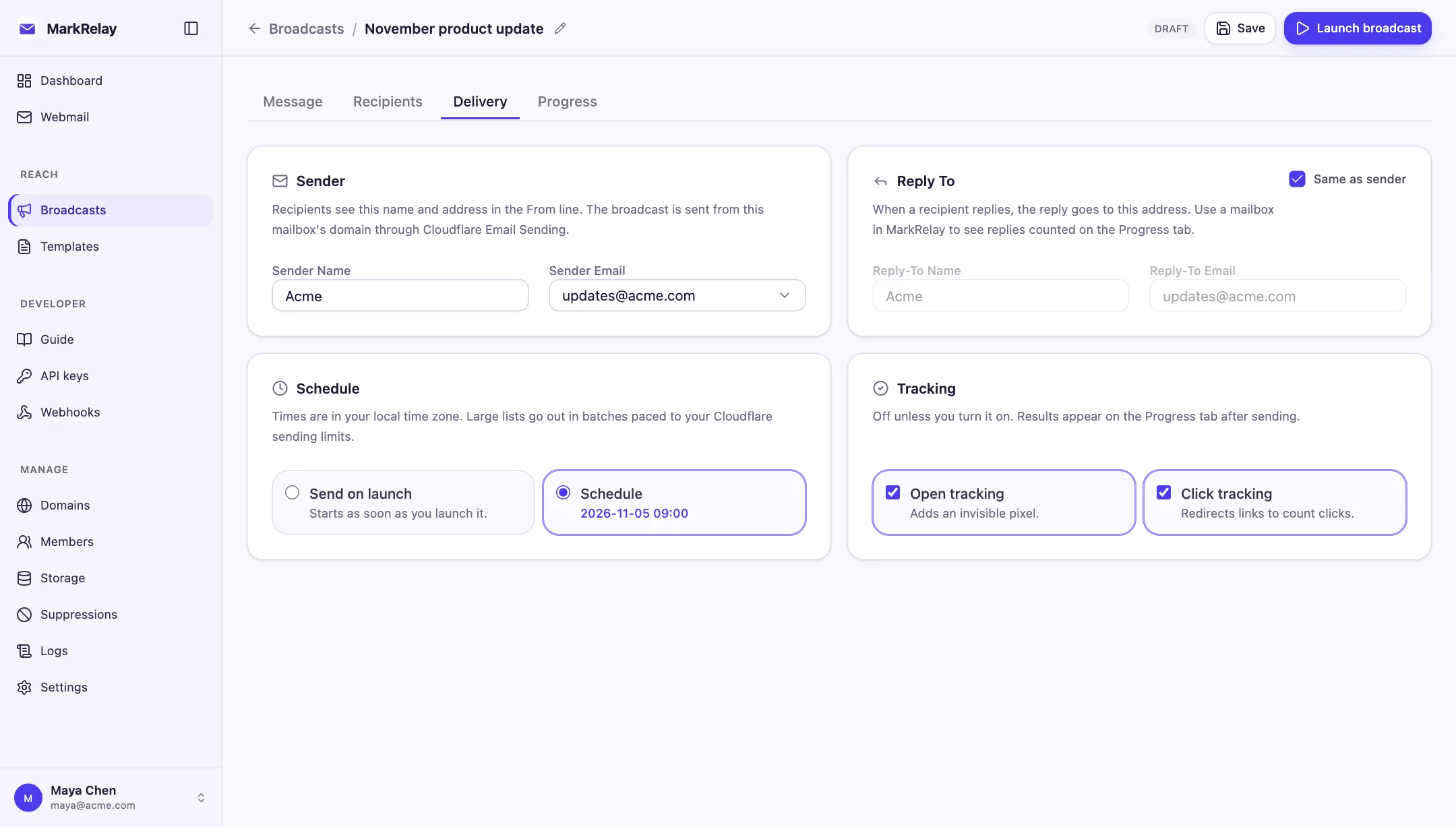
Each broadcast has two switches, open tracking and click tracking, next to the sender and schedule. Both start off. With them off, the email goes out exactly as you designed it: no extra image, and every link points straight at its destination.
Turn one on and MarkRelay changes each recipient's copy as it sends: an open pixel is appended, or links are rewritten through a redirect, both served by your own deployment on your own domain. The results land in the Progress tab, per recipient, in your own D1 database.
France's CNIL recommendation on email tracking pixels (April 2026)
On April 14, 2026, France's data protection authority, the CNIL, published a recommendation on tracking pixels in email. In short: a pixel used to measure opens in marketing email generally needs the recipient's prior consent, and a recipient who does nothing should be treated as refusing. It lists narrow exceptions, such as measuring opens only to stop mailing inactive recipients.
With tracking off by default, you send without tracking anyone until you have consent. MarkRelay does not decide what counts as consent where you send; read the recommendation and take your own advice.
What you still see without tracking
Turning tracking off does not leave you blind. Connect the domain's Email Sending events and the Progress tab shows, for every recipient, whether the message was delivered, deferred, bounced or reported as spam. Replies land in a MarkRelay mailbox your team can read.
Unsubscribes, hard bounces and complaints go on the suppression list automatically, and suppressed addresses are skipped when the next broadcast launches.
- Delivered, deferred, bounced, complained
- Replies in your own mailbox
- One-click unsubscribe on every issue
- Automatic suppression list
Tracking defaults in other newsletter tools
Taken from each tool's own documentation.
| Default | MarkRelay | Buttondown | Mailchimp | beehiiv |
|---|---|---|---|---|
| Open tracking | Off by default, per broadcast | Opt-in | On by default, except plain-text email | — |
| Click tracking | Off by default, per broadcast | Opt-in | On by default | Verified Clicks are on for every account and not optional |
| Where tracking data is stored | Your own D1 database | Buttondown | Mailchimp | beehiiv |
| Sends from | Your domain, through your own Cloudflare account | Buttondown's service | Mailchimp's service | beehiiv's service |
Open tracking
- MarkRelay
- Off by default, per broadcast
- Buttondown
- Opt-in
- Mailchimp
- On by default, except plain-text email
- beehiiv
- —
Click tracking
- MarkRelay
- Off by default, per broadcast
- Buttondown
- Opt-in
- Mailchimp
- On by default
- beehiiv
- Verified Clicks are on for every account and not optional
Where tracking data is stored
- MarkRelay
- Your own D1 database
- Buttondown
- Buttondown
- Mailchimp
- Mailchimp
- beehiiv
- beehiiv
Sends from
- MarkRelay
- Your domain, through your own Cloudflare account
- Buttondown
- Buttondown's service
- Mailchimp
- Mailchimp's service
- beehiiv
- beehiiv's service
“—” means the documentation linked below does not say. Check each tool's settings before sending; defaults can change.
Common questions
Is there a newsletter tool that does not use tracking pixels by default?
Yes. MarkRelay Broadcasts adds no open-tracking pixel and rewrites no links unless you turn tracking on for that broadcast. Both switches start off on every new broadcast.
Can I turn tracking on for some broadcasts only?
Yes. Open tracking and click tracking are separate switches on each broadcast. A cloned broadcast keeps the settings of the one it came from.
Where is tracking data stored if I turn it on?
In your own Cloudflare D1 database. The pixel and the click redirect are served by your own deployment, not by a third-party tracking service.
Do I need consent to track opens in the EU?
France's CNIL said in April 2026 that open-tracking pixels in marketing email generally need prior consent, with narrow exceptions. Rules differ by country; with tracking off by default you can send without tracking until you have consent. Take your own legal advice.
Will I still know whether my newsletter was delivered?
Yes. Delivery, deferrals, bounces and spam complaints come from Cloudflare Email Sending events, not from a pixel, and show per recipient in the Progress tab once the domain's events are connected.
Go deeper
Explore more of MarkRelay
Use cases
Own your email stack today
Buy MarkRelay once and run it in your Cloudflare account. MarkRelay adds no per-message or per-seat charge; Cloudflare usage and service limits remain separate.